
Mynordstrom
MyNordstrom.
Founded in 1901, Nordstrom is an American retail company, specialising in department stores which sell clothing, jewellery, accessories, cosmetics, and other similar products. The company operates more than 300 locations across the United States and is estimated to have around 70,000 employees on the company payroll.
MyNordstrom.com is a multi-purpose online employee platform. As a staff member, it allows you to access important information about your employment, explore ways to further your career, and read the latest news. The site can be accessed from MyNordstrom.com, which redirects to: https://directaccess.nordstrom.com/OA_HTML/AppsLogin.
What Can MyNordstrom Be Used For?
For employees, the MyNordstrom.com platform has a range of uses. For example, it can be used to access your work schedule, while the MyNordstrom MyPay section allows you to view your payslips and check salary information. You can also use the platform to update your personal information, apply for new positions and explore company benefits.
Some of the other features of the platform include a company news section and a training section, where you can find ways to develop your skills. An AskHR feature also allows you to ask questions online.
MyNordstrom Login – How Do I Log In to My MyNordstrom Employee Account?
In order to use the service, you must be a Nordstrom employee, and you must also be in possession of a valid Employee Number. This Employee Number is a combination of letters and numbers (e.g. 4uv96v25) and is written on your payslips. Assuming you have your number ready, head over to MyNordstrom.com or use the direct access link here.
Once the page loads, you should see a login form, asking for your Employee Number and password. If you are logging in for the first time, click on the link labelled ‘Request, Reset or Forgot Password’. Enter your Employee Number, click ‘Request Password’ and a password will be sent to your personal and company email addresses.
In future, to log in, go to the main homepage and enter your Employee Number and password in the relevant fields. Then, click on the ‘Login’ button underneath the form and you should gain access to your account.
I Cannot Log In to My MyNordstrom Account – What Could the Problem Be?
Occasionally, Nordstrom employees encounter difficulties when attempting to sign in to their account. Generally, however, there is a simple solution, so if this happens to you, try the following steps:
1. Test your internet and/or wi-fi connection by visiting another website. If the page fails to load, the problem is with your connection, rather than with the MyNordstrom service itself.
2. Ensure you are using the right web page. The page should be accessible via MyNordstrom.com, but if you have problems, use the direct link, which is: https://directaccess.nordstrom.com/OA_HTML/AppsLogin.
3. Check that you are entering the right Employee Number and password and that you are inserting them into the right fields. Your password is case sensitive, so you should also make sure CAPS LOCK is turned off.
4. If you are logging in for the first time, make sure you click on the link labelled ‘Request, Reset or Forgot Password’, because you will not have a valid password to use until you complete this step.
5. Try updating your web browser to the latest version, or clearing your browsing data and cookies. Then, try logging in again. If that fails, try signing in using a different web browser, or even a different device entirely.
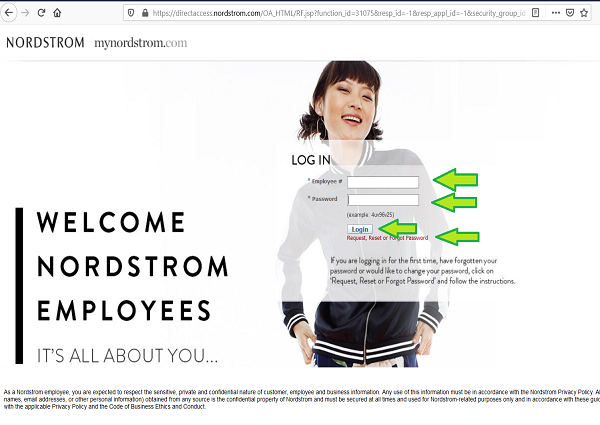
Enter your Password, paying attention to Upper and Lower cases (example: 4uv96v25).
Click on Login.
Click on “Request, Reset or Forgot Password”, if you have forgotten your password.
I Have Lost My MyNordstrom.com Password – How Do I Reset It?
If you forget your password, a recovery option is available, meaning you will not be locked out of your account for long. All you need to do is go to the main homepage, click on the link labelled ‘Request, Reset or Forgot Password’ and enter your Employee Number in the field provided. Then click on the ‘Request Password’ button.
Instructions for resetting your password will then be sent to the email address on file.
MyNordstrom Schedule – How Do I View My Schedule?
In order to view your schedule on the platform, you will need a Registration Key. This should be given to you by your store administrator, so you will need to contact them if you have not yet received it. Once you have the Registration Key, head over to MyNordstrom and log in using the usual method.
Go to the ‘My Schedule’ tab and click on ‘Log In to My Schedule’. Then, click on the link labelled ‘Self-Service Registration’, enter your Employee Number and your Registration Key, and click ‘Log In’. You will then be required to select and answer a series of security questions, and choose a password. Complete this section and click ‘Finish’.
You should then log out of your account to conclude the self-service registration process. In future, you will be able to view your schedule by logging in to your MyNordstrom account and clicking the ‘Log In to My Schedule’ link. From there, simply log in using the password you created during self-registration and your schedule will be displayed.
Nordstrom Careers – How Do I Become a Nordstrom Employee?
If you are not currently a Nordstrom employee, but are interested in becoming one, you should visit the separate Nordstrom Careers website, which can be found at careers.nordstrom.com. This page can also be accessed from the main MyNordstrom homepage, by clicking on a link labelled ‘Not An Employee?’
On this page, you will find a number of navigation options, including a ‘Hot Jobs’ link and a ‘Search for Jobs’ function.
Nordstrom Contacts – How to Reach the Nordstrom HR Department
It may be necessary to get in touch with the HR or customer service team and you can do this in the following ways.
By Telephone:
Call 888 282 6060 to contact the Nordstrom customer service team over the phone. Alternatively, if you want to connect to the Nordstrom Corporate Office, you can do so by dialling 206 628 2111 instead.
By Fax:
If you use a fax machine, you can reach the Nordstrom help desk on 206 628 1795.
By Mail:
Finally, you also have the option to send your questions or comments about the login experience on Mynordstrom via mail. The address for the Nordstrom Corporate Office is as follows:
1617 6th Ave., Seattle, WA, 98101
I don’t want to join a fee based IT site. I want to be connected to Nordstrom IT.
I don’t want to join.
I can’t get the website up.It says the problem is being fixed but it has been 4 days and gives me same error.Why?I need into my account.
Trying to log in.
I beeb try to sing in on my nordstrom but the system don’t let me do it I need to review my insurance
Need change of password for workday to print out paystubs